

Ember & Olive — Restaurant Menu
A beautiful static restaurant menu website designed for QR-code access, featuring categorized dishes, prices, dietary labels, chef recommendations, daily specials, restaurant information, and a mobile-first layout optimized for customers viewing the menu on their phones.
Examples
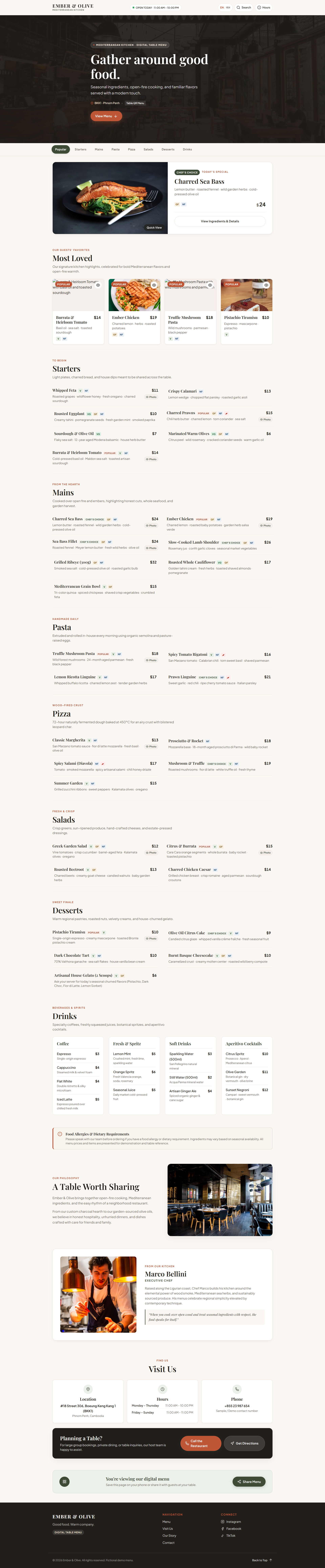
Full prompt
Ember & Olive — Restaurant Static Menu Website
Create a complete, production-quality, visually beautiful static restaurant menu website called Ember & Olive using only vanilla HTML, CSS, and JavaScript.
The website is designed primarily for customers who scan a QR code from a restaurant table and open the menu on their phone.
It must feel like a real modern restaurant's digital menu — not a generic website template.
The most important goals are:
- Extremely easy to browse
- Mobile-first
- Fast loading
- Beautiful food photography
- Clear prices
- Easy category navigation
- Excellent typography
- Easy-to-read dish descriptions
- Professional restaurant branding
Do NOT create:
- Online ordering
- Payment
- Login
- Checkout
- Delivery tracking
- Backend
- Database
- Fake reservation processing
This is a static digital menu.
1. REQUIRED FILES
Create exactly:
index.htmlstyle.cssscript.js
All HTML goes in index.html.
All CSS goes in style.css.
All JavaScript goes in script.js.
The website must work immediately when these files are placed in the same directory.
No installation or build process should be required.
2. TECHNOLOGY
Use ONLY:
- HTML5
- CSS3
- Vanilla JavaScript
Do NOT use:
- React
- Vue
- Angular
- Svelte
- Next.js
- Tailwind CSS
- Bootstrap
- jQuery
- external JavaScript libraries
- npm
- backend frameworks
- databases
Use inline SVG icons where appropriate.
3. BRAND
Restaurant:
EMBER & OLIVE
Tagline:
Good food. Warm company.
Restaurant style:
Modern Mediterranean-inspired neighborhood restaurant.
Atmosphere:
- Warm
- Contemporary
- Casual premium
- Welcoming
- Natural
- Food-focused
Use a sophisticated identity rather than a generic restaurant logo.
4. COLOR DIRECTION
Use a warm restaurant palette.
Suggested colors:
- Warm cream
- Charcoal
- Deep olive
- Terracotta
- Soft beige
- Muted brown
Avoid excessive gradients.
Avoid making the entire website dark.
Use warm colors naturally.
5. TYPOGRAPHY
Use:
- Elegant editorial serif-style typography for major headings
- Clean sans-serif typography for menu items
- Small uppercase labels for categories
Menu item names should be highly readable.
Prices should have strong alignment.
Descriptions should remain short.
Use clamp() for responsive headings.
6. MOBILE-FIRST REQUIREMENT
This website is primarily a mobile digital menu.
Design carefully for:
- 320px
- 375px
- 390px
- 430px
Then support:
- Tablet
- Desktop
- Large desktop
The mobile experience must be excellent.
Do NOT simply shrink a desktop restaurant website.
7. HEADER
Create a compact restaurant header.
Include:
EMBER & OLIVE
Small status:
OPEN TODAY · 11:00 AM – 10:00 PM
Add icons/buttons for:
- Menu
- Information
Keep the header compact.
8. HERO
Create a beautiful compact hero.
Use a high-quality food image.
Small label:
MEDITERRANEAN KITCHEN
Main heading:
Gather around good food.
Supporting copy:
“Seasonal ingredients, open-fire cooking, and familiar flavors served with a modern touch.”
CTA:
View Menu
Add restaurant location:
BKK1 · Phnom Penh
Use fictional/demo restaurant information.
9. QUICK CATEGORY NAVIGATION
Immediately below the hero, create a sticky horizontal category navigation.
Categories:
- Popular
- Starters
- Mains
- Pasta
- Pizza
- Salads
- Desserts
- Drinks
Clicking a category should smoothly scroll to that section.
Highlight the currently selected category.
On mobile:
- Make it horizontally scrollable
- Keep category buttons large enough to tap
- Keep the active category visible where practical
10. TODAY'S SPECIAL
Create a visually distinct section:
Today's Special
Example:
Charred Sea Bass
Lemon butter · roasted fennel · herbs · olive oil
$24
Add:
Chef's Choice
badge.
Use a large food image.
This should visually break up the menu.
11. POPULAR DISHES
Create:
Most Loved
Show 4 popular dishes.
Burrata & Heirloom Tomato
Basil oil · sea salt · toasted sourdough
$14
Ember Chicken
Charred lemon · herbs · roasted potatoes
$19
Truffle Mushroom Pasta
Wild mushrooms · parmesan · black pepper
$18
Pistachio Tiramisu
Espresso · mascarpone · pistachio
$10
Add a small:
Popular
badge where appropriate.
12. MENU SECTION
Create the primary menu.
Each category should have:
- Category title
- Short description
- Menu items
Do NOT put every menu item inside a large card.
Use a clean editorial menu list.
13. STARTERS
Create at least 5 dishes.
Examples:
Whipped Feta
Roasted grapes · honey · herbs
$11
Crispy Calamari
Lemon · parsley · garlic aioli
$13
Roasted Eggplant
Tahini · pomegranate · mint
$10
Charred Prawns
Chili butter · lemon · herbs
$15
Sourdough & Olive Oil
Sea salt · aged balsamic
$7
14. MAINS
Create at least 6 dishes.
Examples:
Ember Chicken
Charred lemon · roasted potatoes · herbs
$19
Sea Bass
Roasted fennel · lemon butter · herbs
$24
Lamb Shoulder
Rosemary · garlic · seasonal vegetables
$26
Grilled Ribeye
Olive oil · sea salt · roasted garlic
$32
Roasted Cauliflower
Tahini · herbs · toasted almonds
$17
Mediterranean Grain Bowl
Quinoa · chickpeas · vegetables · feta
$15
15. PASTA
Create at least 4 dishes.
Examples:
Truffle Mushroom Pasta
Wild mushrooms · parmesan · black pepper
$18
Spicy Tomato Rigatoni
Tomato · chili · basil · parmesan
$16
Lemon Ricotta Linguine
Ricotta · lemon · herbs
$17
Prawn Linguine
Garlic · chili · tomato · parsley
$21
16. PIZZA
Create at least 5 dishes.
Examples:
Margherita
Tomato · mozzarella · basil
$13
Prosciutto & Rocket
Mozzarella · prosciutto · rocket
$18
Spicy Salami
Tomato · mozzarella · chili · salami
$17
Mushroom & Truffle
Mushrooms · mozzarella · truffle oil
$19
Garden
Zucchini · peppers · olives · herbs
$15
17. SALADS
Create at least 4.
Examples:
Greek Garden
Tomato · cucumber · feta · olives · oregano
$12
Citrus Burrata
Orange · burrata · rocket · pistachio
$15
Roasted Beet
Beetroot · goat cheese · walnuts · herbs
$13
Chicken Caesar
Chicken · romaine · parmesan · sourdough
$14
18. DESSERTS
Create at least 5.
Examples:
Pistachio Tiramisu
Espresso · mascarpone · pistachio
$10
Olive Oil Cake
Citrus · cream · seasonal fruit
$9
Dark Chocolate Tart
Sea salt · vanilla cream
$10
Burnt Basque Cheesecake
Berry compote · cream
$10
Gelato
Ask your server for today's flavors.
$6
19. DRINKS
Create categories:
Coffee
Espresso — $3
Cappuccino — $4
Flat White — $4
Iced Latte — $5
Fresh
Lemon Mint — $5
Orange Spritz — $6
Seasonal Juice — $5
Soft Drinks
Sparkling Water — $3
Still Water — $2
Ginger Ale — $4
Cocktails
Citrus Spritz — $10
Olive Garden — $11
Sunset Negroni — $12
Clearly treat all menu prices as fictional/demo content.
20. DIETARY LABELS
Support visual dietary labels.
Use labels such as:
- V
- VG
- GF
- NF
- Spicy
Include a small legend:
V Vegetarian VG Vegan GF Gluten Friendly NF Nut Free 🌶 Spicy
Do not make medical allergy guarantees.
Use:
Please inform our staff of any allergies or dietary requirements.
21. MENU ITEM DETAILS
Each item should support:
- Name
- Description
- Price
- Dietary labels
- Popular badge
- Chef choice badge
- Optional image
Do not make every item use an image.
Use photography strategically.
This will keep the menu elegant and fast.
22. ITEM QUICK VIEW
Allow menu items with images to open a quick-view modal.
Display:
- Large image
- Item name
- Description
- Price
- Dietary labels
- Ingredients
Button:
Close
This is informational only.
Do not add cart functionality.
23. SEARCH MENU
Add a search button near the menu navigation.
Clicking it opens a compact search field.
Placeholder:
Search dishes...
Examples:
- chicken
- pasta
- vegetarian
- dessert
- spicy
Filter the menu items in real time using JavaScript.
Show:
No dishes found. Try another search.
24. FILTER BY DIET
Create an optional filter:
Dietary
Options:
- All
- Vegetarian
- Vegan
- Gluten Friendly
- Spicy
Implement using JavaScript.
Allow the user to combine search and dietary filtering.
25. ALLERGEN NOTICE
Create a dedicated small notice:
Food Allergies
“Please speak with our team before ordering if you have a food allergy or dietary requirement. Ingredients may vary.”
Do not make absolute safety claims.
26. RESTAURANT STORY
Create:
A Table Worth Sharing
Short copy:
“Ember & Olive brings together open-fire cooking, Mediterranean ingredients, and the easy rhythm of a neighborhood restaurant.”
Use one beautiful restaurant interior image.
Keep this section short because this is primarily a menu.
27. CHEF SECTION
Create a small section:
From Our Kitchen
Chef:
Marco Bellini
Role:
Executive Chef
Short fictional bio explaining his approach to seasonal ingredients and open-fire cooking.
Use a professional food/kitchen image rather than a generic corporate portrait.
28. RESTAURANT INFORMATION
Create:
Visit Us
Include:
Location
BKK1 Phnom Penh, Cambodia
Use a fictional street address.
Hours
Monday–Thursday 11:00 AM – 10:00 PM
Friday–Sunday 11:00 AM – 11:00 PM
Phone
Use a clearly fictional placeholder.
29. RESERVATION CTA
Because this is a menu site, include a simple CTA:
Planning a Table?
Button:
Call the Restaurant
Button:
Get Directions
These can use placeholder links.
Do NOT build an online reservation system.
30. QR MENU SECTION
Create a small section near the bottom:
You're viewing our digital menu
Text:
“Save this page for your next visit.”
Add:
Share Menu
button.
Implement the Share button using the Web Share API where supported.
If unavailable:
- Copy the current page URL
- Show confirmation
Handle errors gracefully.
31. LANGUAGE SWITCHER
Add a simple language control:
EN
KH
For the demo:
When KH is selected, switch selected UI labels to simple Khmer translations.
At minimum translate:
- Menu
- Popular
- Starters
- Mains
- Desserts
- Drinks
- Search
- Information
Do not translate every dish if unnecessary.
The switch should work entirely on the frontend.
32. OPEN / CLOSED STATUS
Create a dynamic restaurant status.
Using JavaScript, determine whether the current local time falls within the demo opening hours.
Display:
OPEN NOW
or:
CLOSED
Also display:
Next opening: 11:00 AM
Use the restaurant's intended local timezone where practical.
Clearly treat the hours as sample/demo data.
33. FOOTER
Create a compact restaurant footer.
Include:
EMBER & OLIVE
Good food. Warm company.
Links:
- Menu
- Visit
- Contact
Social:
- TikTok
Add:
Digital Menu
and dynamic copyright year.
34. JAVASCRIPT FUNCTIONALITY
Implement:
- Sticky category navigation
- Active category detection
- Smooth category scrolling
- Menu search
- Dietary filtering
- Combined search/filter logic
- Item quick-view modal
- Language switcher
- Open/closed status
- Share menu
- Copy URL fallback
- Scroll reveal
- Back-to-top
- Dynamic year
Use vanilla JavaScript only.
35. SEARCH PERFORMANCE
Menu search should feel instant.
Use the JavaScript menu dataset rather than repeatedly querying the DOM.
Normalize:
- lowercase
- whitespace
- punctuation where practical
Search:
- Item name
- Description
- Category
- Dietary labels
36. MENU DATA
Store the menu in a structured JavaScript array.
Each item should contain fields such as:
namecategorydescriptionpricedietspicypopularchefChoiceimage
Use this dataset for:
- Search
- Filtering
- Quick View
This makes the static menu easy to update later.
37. IMAGE DIRECTION
Use high-quality food photography.
Suitable:
- Mediterranean dishes
- Pasta
- Pizza
- Grilled seafood
- Fresh vegetables
- Desserts
- Restaurant interiors
- Chef/kitchen details
Use images strategically.
Do not put an image next to every menu item.
Prioritize:
- Today's Special
- Popular dishes
- Story
- Chef
- Selected menu items
Lazy-load below-the-fold images.
Use meaningful alt text.
38. RESPONSIVE DESIGN
The website must work beautifully on:
- 320px
- 375px
- 390px
- 430px
- Tablet
- Desktop
Mobile should prioritize:
- Restaurant identity
- Category navigation
- Search
- Menu items
- Prices
- Dietary information
- Restaurant information
Desktop can use:
- Two-column menu layouts
- Larger editorial images
- Wider spacing
Do not sacrifice readability for visual decoration.
39. ACCESSIBILITY
Use semantic HTML.
Ensure:
- One H1
- Logical heading hierarchy
- Accessible category buttons
- Accessible search
- Accessible filter controls
- Accessible modal
- Visible focus states
- Form/input labels
- Good contrast
- Keyboard support
- ARIA attributes where needed
Do not rely only on color for dietary labels.
Use text abbreviations as well.
40. SEO
Add restaurant menu SEO metadata.
Include:
- Page title
- Meta description
- Canonical placeholder
- Open Graph title
- Open Graph description
- Open Graph image placeholder
- Twitter card
- Theme color
Add Restaurant structured data using JSON-LD.
Use fictional/demo restaurant information.
Do not claim:
- Awards
- Michelin stars
- Real reviews
- Certifications
41. PERFORMANCE
The website should be extremely lightweight.
Requirements:
- No frameworks
- No external JavaScript libraries
- No background video
- Lazy-loaded images
- Efficient menu rendering
- Efficient filtering
- Minimal animations
- No unnecessary requests
- No layout shifts
This page should be appropriate for customers scanning a QR code on mobile.
42. MOTION
Use subtle motion only.
Suitable:
- Category underline movement
- Menu item reveal
- Image hover
- Modal transition
- Search transition
- Scroll reveal
Avoid:
- Large parallax effects
- Bouncing food cards
- Excessive animation
- Floating objects
- Distracting effects
Respect:
prefers-reduced-motion
43. CSS QUALITY
Organize CSS:
- Variables
- Reset
- Base
- Typography
- Header
- Hero
- Category navigation
- Menu
- Menu items
- Filters
- Modal
- Story
- Chef
- Restaurant information
- Footer
- Animation
- Responsive
- Reduced motion
Use:
- CSS variables
- Grid
- Flexbox
clamp()aspect-ratio- Modern responsive CSS
Avoid excessive !important.
44. CONTENT QUALITY
Do not use Lorem Ipsum.
Write realistic restaurant copy.
Keep dish descriptions short.
Use a consistent naming style.
Do not overuse marketing phrases such as:
- Best restaurant in town
- World-class cuisine
- Unforgettable dining
- Culinary masterpiece
Make the restaurant feel authentic.
45. VISUAL RHYTHM
The menu should feel like:
Restaurant identity
→ Hero dish
→ Category navigation
→ Today's Special
→ Most Loved
→ Starters
→ Mains
→ Pasta
→ Pizza
→ Salads
→ Desserts
→ Drinks
→ Allergy notice
→ Restaurant story
→ Chef
→ Visit
→ Share menu
→ Footer
Do NOT turn every section into a giant image/card grid.
The food menu itself should remain the main focus.
46. FINAL QUALITY CHECK
Before returning the code, verify:
- All three files connect
- Mobile layout works
- Category navigation works
- Active category updates
- Search works
- Dietary filters work
- Search + filter work together
- Quick-view modal works
- Language switch works
- Open/closed status works
- Share menu works
- URL copy fallback works
- All menu prices align correctly
- No horizontal overflow
- Images load correctly
- Images have alt text
- Keyboard navigation works
- No console errors
- No undefined JavaScript variables
- Reduced-motion support works
- No prohibited dependencies are used
- No online ordering/payment functionality exists
Fix all issues before returning the code.
47. FINAL OUTPUT FORMAT
Return exactly three complete code sections:
index.html
Provide the complete HTML.
style.css
Provide the complete CSS.
script.js
Provide the complete JavaScript.
Do NOT use:
“remaining code”
“continue here”
“add more dishes”
“same pattern”
Do not return pseudo-code.
Do not omit implementation to shorten the response.
Everything must be complete and immediately usable.
The final Ember & Olive website should feel warm, elegant, mobile-first, extremely easy to browse, fast, restaurant-quality, QR-menu friendly, and visually polished enough to demonstrate the power of a static website built with The SiteHub.
Copy prompt manually
Automatic copying is blocked on this connection. The full prompt is selected below. Press Ctrl+C to copy it.