

BlackSignal — Cinematic Hacker Portfolio
A cinematic fictional hacker portfolio inspired by techno-thriller movies, featuring dramatic terminal visuals, coded identity sections, mission-style project showcases, encrypted-note aesthetics, and immersive motion. BlackSignal is designed for visual storytelling and portfolio presentation only, with no real hacking functionality.
Examples
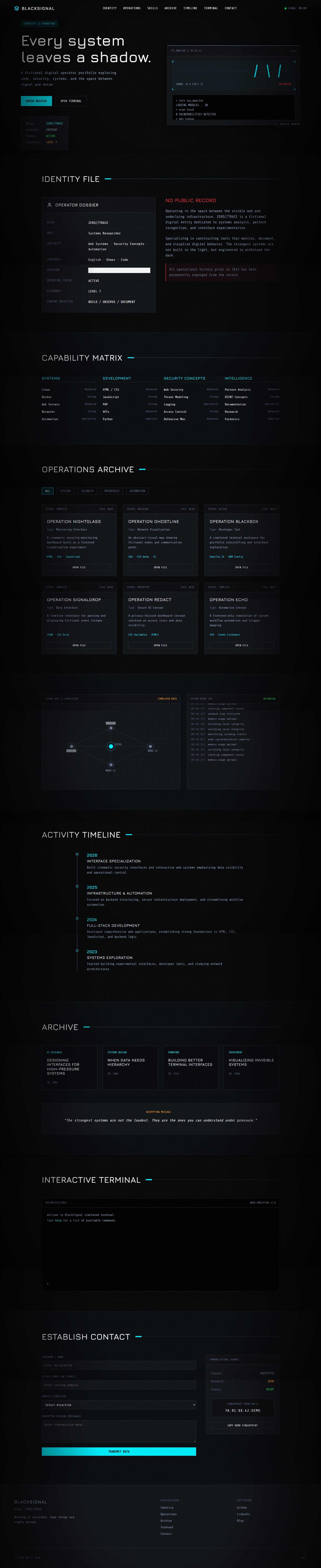
Full prompt
BlackSignal — Cinematic Movie Hacker Portfolio
Create a complete, production-quality, visually exceptional fictional hacker portfolio website called BlackSignal using only vanilla HTML, CSS, and JavaScript.
The website should feel like the personal interface of a mysterious hacker character from a modern techno-thriller movie.
This is a cinematic fictional portfolio, not a real hacking tool.
Do NOT include:
- Real exploit code
- Malware
- Credential theft
- Phishing instructions
- Payloads
- Real scanning
- Shell execution
- Real network attacks
- Destructive commands
- Bypass instructions
- Operational hacking techniques
All terminal interactions, commands, scans, alerts, logs, and system data must be simulated and fictional.
The site should prioritize:
- Cinematic atmosphere
- Strong visual identity
- Storytelling
- Immersion
- Portfolio presentation
- Safe simulated terminal interactions
- Responsive design
1. REQUIRED FILES
Create exactly:
index.htmlstyle.cssscript.js
Keep all HTML in index.html.
Keep all CSS in style.css.
Keep all JavaScript in script.js.
Correctly link the files.
The website must work immediately when the three files are placed in the same directory.
No installation, build system, framework, or package manager should be required.
2. TECHNOLOGY RESTRICTIONS
Use ONLY:
- HTML5
- CSS3
- Vanilla JavaScript
Do NOT use:
- React
- Vue
- Angular
- Svelte
- Next.js
- Tailwind CSS
- Bootstrap
- jQuery
- GSAP
- npm
- external JavaScript libraries
- backend code
- real shell execution
- real OS commands
- real network requests for hacking purposes
Use inline SVG icons where appropriate.
3. BRAND IDENTITY
Identity:
BLACKSIGNAL
Alias:
ZERO//TRACE
Tagline:
Nothing is invisible. Some things are simply unread.
Create a fictional movie-character identity around BlackSignal.
The character should feel:
- Anonymous
- Intelligent
- Controlled
- Technical
- Observant
- Slightly threatening in a cinematic way
- Mysterious
- Strategic
Do not make the character seem criminal in an instructional sense.
This is visual storytelling only.
4. VISUAL STYLE
Use a cinematic cyber-thriller aesthetic.
Suggested palette:
- Deep black
- Graphite
- Cold gray
- Terminal green
- Muted red
- Cyan
- Occasional amber alerts
Use red very carefully.
Visual elements may include:
- CRT-inspired scan lines
- Thin grid overlays
- Terminal windows
- Surveillance-style UI
- File labels
- System timestamps
- Coordinates-like fictional metadata
- Noise textures
- Distorted section dividers
- Monospace labels
- Sharp panel edges
Avoid making everything neon.
Avoid turning the site into a video game HUD.
Keep it cinematic and premium.
5. TYPOGRAPHY
Use:
- Strong condensed or modern sans-serif headings
- Monospace technical labels
- Clean readable body typography
Do not use monospace for every paragraph.
Typography should feel like:
- Classified files
- Surveillance software
- Command consoles
- Digital intelligence systems
Use clamp() for responsive sizing.
6. INTRO SEQUENCE
Create a short cinematic loading/introduction sequence.
Example:
INITIALIZING BLACKSIGNAL
then:
IDENTITY MASKED
then:
SESSION: AUTHORIZED
then reveal the website.
Duration should be short.
Do not make visitors wait too long.
Respect prefers-reduced-motion.
If JavaScript fails, the site must still load normally.
7. NAVIGATION
Create a compact technical navigation.
Include:
- BLACKSIGNAL
- Identity
- Operations
- Skills
- Archive
- Timeline
- Terminal
- Contact
Add a small status indicator:
SIGNAL: ONLINE
On scroll, turn the navbar into a more solid technical panel.
8. MOBILE NAVIGATION
Create a cinematic full-screen mobile menu.
Include:
- Alias
- Main links
- Status
- Contact action
Requirements:
- Accessible menu button
- Escape closes
- Link click closes
- Body scroll lock
- Large touch targets
- Correct ARIA state
9. HERO SECTION
Create a dramatic full-screen hero.
Left side:
Small label:
IDENTITY // REDACTED
Main headline:
Every system leaves a shadow.
Supporting copy:
“A fictional digital operator portfolio exploring code, security, systems, and the space between signal and noise.”
Primary CTA:
Enter Archive
Secondary CTA:
Open Terminal
Add a small identity block:
Alias: ZERO//TRACE
Location: UNKNOWN
Status: ACTIVE
Clearance: LEVEL 7
Use fictional labels only.
10. HERO VISUAL
Create a cinematic interface composition using HTML/CSS.
Include:
- Terminal panel
- Surveillance-style image frame
- Signal graph
- Redacted text blocks
- System status
- Floating metadata
- File ID
- Timestamp
- Animated cursor
Do not use a hooded hacker stock image as the main visual.
Build most of the atmosphere with interface design.
11. SAFE TERMINAL PANEL
Create a simulated terminal.
Example lines:
> identity
Output:
ZERO//TRACE
> origin
Output:
REDACTED
> role
Output:
DIGITAL SYSTEMS OPERATOR
> status
Output:
ACTIVE
> clearance
Output:
LEVEL 7
This is all fictional.
No real command execution.
12. IDENTITY SECTION
Create:
IDENTITY FILE
Use a classified-dossier layout.
Fields:
- Alias
- Role
- Specialty
- Languages
- Location
- Operating Status
- Clearance
- Current Objective
Example:
Alias: ZERO//TRACE
Role: Systems Researcher
Specialty: Web Systems · Security Concepts · Automation
Languages: English · Khmer · Code
Current Objective: BUILD / OBSERVE / DOCUMENT
Use stylized redacted lines.
13. BACKSTORY SECTION
Create a fictional cinematic backstory.
Heading:
NO PUBLIC RECORD
Write concise storytelling about a mysterious developer/security researcher who:
- Studies systems
- Builds tools
- Analyzes patterns
- Experiments with interfaces
- Documents digital behavior
Avoid real criminal acts.
Keep it like a movie character profile.
14. CAPABILITIES
Create:
CAPABILITY MATRIX
Categories:
Systems
- Linux
- Docker
- Web Servers
- Networks
- Automation
Development
- HTML
- CSS
- JavaScript
- PHP
- APIs
Security Concepts
- Web Security
- Threat Modeling
- Logging
- Access Control
- Defensive Monitoring
Intelligence
- Pattern Analysis
- OSINT Concepts
- Documentation
- Research
- Digital Forensics Concepts
Keep all content safe and high-level.
15. SKILL VISUALIZATION
Use technical bars or matrix-style indicators.
Do not use fake “99% hacker skill.”
Instead use labels like:
- Familiar
- Strong
- Advanced
- Specialist
Create a more professional visual.
16. OPERATIONS SECTION
Create:
OPERATIONS ARCHIVE
These are fictional portfolio projects presented like classified missions.
Include 6 projects.
Example:
OPERATION NIGHTGLASS
Type: Monitoring Interface
Description: “A cinematic security-monitoring dashboard built as a frontend visualization experiment.”
Status: COMPLETE
Tech: HTML · CSS · JavaScript
OPERATION GHOSTLINE
Type: Network Visualization
Description: “An abstract visual map showing fictional nodes and communication paths.”
OPERATION BLACKBOX
Type: Developer Tool
Description: “A simulated terminal workspace for portfolio storytelling.”
OPERATION SIGNALDROP
Type: Data Interface
Description: “A timeline interface for fictional event streams.”
OPERATION REDACT
Type: Secure UI Concept
Description: “A privacy-focused dashboard concept centered on access and visibility.”
OPERATION ECHO
Type: Automation Concept
Description: “A frontend-only simulation of system workflow automation.”
No real attacks or exploitation.
17. PROJECT PRESENTATION
Present each project as a dossier.
Include:
- Operation name
- File ID
- Status
- Classification
- Description
- Tech stack
- Screenshot/mockup
- Open File CTA
Use varied layouts.
Do not use standard portfolio cards.
18. OPERATION FILTERS
Create filters:
- All
- Systems
- Security
- Interfaces
- Automation
- Research
Implement with vanilla JavaScript.
Use cinematic transition effects.
19. OPERATION DETAIL MODAL
Clicking a project opens a dossier modal.
Include:
- Operation name
- Mission summary
- Role
- Tools
- Outcome
- Interface images
- Status
- File ID
Use fictional content only.
Requirements:
- Escape closes
- Outside click closes
- Keyboard accessible
- Scroll lock
20. SIGNAL MAP
Create a visual fictional network map using HTML/CSS/SVG.
Label:
SIGNAL MAP // SIMULATION
Show fictional nodes:
- NODE-01
- NODE-07
- NODE-12
- NODE-21
Use animated signal lines.
Clearly indicate:
SIMULATED DATA
Do not imply real tracking.
21. SYSTEM LOG
Create a scrolling visual log.
Example:
23:41:02 archive accessed
23:41:05 project index loaded
23:41:09 signal map initialized
23:41:12 identity masked
23:41:15 session stable
Keep logs fictional and harmless.
22. TIMELINE
Create:
ACTIVITY TIMELINE
Use fictional career/project history.
Example:
2026
Built cinematic security interfaces and interactive web systems.
2025
Focused on Laravel, infrastructure, and automation.
2024
Developed full-stack web applications.
2023
Started building experimental interfaces and developer tools.
Use a vertical technical timeline.
23. ARCHIVE SECTION
Create:
ARCHIVE
Add content types:
- Notes
- Interface Experiments
- System Concepts
- Visual Research
Create 4 archive entries.
Example:
Designing Interfaces for High-Pressure Systems
UI Research
When Data Needs Hierarchy
Systems Design
Building Better Terminal Interfaces
Frontend
Visualizing Invisible Systems
Experiment
Keep content design-focused and safe.
24. ENCRYPTED NOTE EFFECT
Create one special note section.
Display scrambled placeholder characters briefly, then reveal text.
Example final text:
“The strongest systems are not the loudest. They are the ones you can understand under pressure.”
This is purely a visual effect.
Respect reduced-motion settings.
25. INTERACTIVE TERMINAL
Create a larger safe fake terminal section.
Supported commands:
help
identity
skills
operations
archive
timeline
status
contact
clear
signal
whoami
Example:
> help
Output:
Available commands: identity, skills, operations, archive, timeline, status, signal, contact, clear
Only use fixed allowlisted responses.
No real command execution.
26. TERMINAL SAFETY
Never use:
eval()Function()- shell execution
- user-generated HTML injection
- real network commands
- real system commands
Treat user input as plain text.
Unknown commands return:
UNKNOWN COMMAND // TYPE "help"
27. TERMINAL UX
Support:
- Up/down history
- Enter to execute
- Clear command
- Auto-scroll
- Cursor animation
- Mobile input
- Keyboard focus
Keep effects quick.
Do not simulate real hacking tasks.
28. CONTACT SECTION
Create:
ESTABLISH CONTACT
Use a cinematic encrypted-contact aesthetic.
Fields:
- Codename / Name
- Subject
- Message
Subject options:
- Collaboration
- Development
- Creative Project
- Security Research
- Other
Frontend-only validation.
After successful validation show:
“Transmission prepared. This demo does not send data to a real server.”
Do not pretend it transmitted.
29. SECURE CHANNEL PANEL
Create a small fictional communication panel.
Show:
Channel: ENCRYPTED
Protocol: DEMO
Status: READY
Fingerprint:
7A:91:XX:42:DEMO
Clearly mark fingerprint as fake/demo.
Add:
Copy Demo Fingerprint
button.
30. FOOTER
Create a cinematic footer.
Include:
BLACKSIGNAL
Alias: ZERO//TRACE
Tagline:
Nothing is invisible. Some things are simply unread.
Navigation:
- Identity
- Operations
- Archive
- Terminal
- Contact
Social:
- GitHub
- Blog
Add:
SESSION END // <dynamic year>
Add back-to-top control.
31. JAVASCRIPT FUNCTIONALITY
Implement:
- Intro sequence
- Mobile navigation
- Navbar state
- Active section tracking
- Smooth scrolling
- Hero terminal typing
- Project filters
- Dossier modal
- Fictional signal-map animations
- System log animation
- Encrypted text reveal
- Safe terminal
- Terminal history
- Copy demo fingerprint
- Contact form validation
- Scroll reveal
- Dynamic year
- Back-to-top
Use vanilla JavaScript only.
32. MOTION STYLE
Use cinematic technical motion.
Good effects:
- Terminal typing
- Line drawing
- Soft flicker
- Short glitch transition
- Scan-line movement
- Text decoding
- Panel reveal
- Signal pulse
Use effects sparingly.
Avoid:
- Constant screen shake
- Aggressive glitch
- Flashing lights
- Rapid red alerts
- Heavy strobe effects
- Continuous animations everywhere
Respect prefers-reduced-motion.
33. GLITCH EFFECT
A light glitch effect may be used on:
- BLACKSIGNAL logo
- Section transitions
- Alias text
The glitch must be short and subtle.
Do not make text difficult to read.
Do not continuously glitch the whole page.
34. BACKGROUND DETAILS
Use subtle background elements:
- Grid
- Noise
- Scan lines
- Small coordinate-like labels
- Thin crosshair marks
- Data ticks
- File numbers
Keep opacity low.
The page must remain readable.
35. IMAGE DIRECTION
Use images sparingly.
Suitable imagery:
- Dark city at night
- Computer workstation
- Data center
- Abstract digital infrastructure
- Rainy urban scenes
- Surveillance-style architecture
- Technical equipment
Avoid:
- Real criminals
- Weapons
- Skulls
- Anonymous masks
- Real sensitive data
Most visuals should come from UI design rather than stock photos.
36. RESPONSIVE DESIGN
Design intentionally for:
- 320px mobile
- 375px mobile
- 430px mobile
- Tablet
- Laptop
- Desktop
- Large desktop
On mobile:
- Simplify hero composition
- Reduce signal-map complexity
- Make terminal text wrap correctly
- Stack dossier sections
- Keep buttons touch-friendly
- Reduce decorative metadata
- Avoid text overflow
- Keep modal within viewport
No horizontal overflow.
37. MOBILE EXPERIENCE
The mobile version should feel like a cinematic handheld terminal.
Use:
- Strong vertical rhythm
- Compact technical labels
- Large touch controls
- Scrollable terminal areas
- Simplified visual effects
Do not shrink desktop UI until unreadable.
38. ACCESSIBILITY
Use semantic HTML.
Ensure:
- One H1
- Logical heading hierarchy
- Accessible navigation
- Keyboard-accessible terminal
- Accessible modals
- Visible focus states
- Form labels
- Good contrast
- Reduced-motion support
- Buttons instead of clickable divs
Do not rely only on green/red color.
39. SEO
Add portfolio SEO metadata.
Include:
- Page title
- Meta description
- Canonical placeholder
- Open Graph title
- Open Graph description
- Open Graph image placeholder
- Twitter card
- Theme color
Add Person structured data with fictional/sample information.
Do not add fake real-world credentials.
40. PERFORMANCE
Keep the site lightweight.
Requirements:
- No frameworks
- No external JS libraries
- No background video
- Efficient animations
- Minimal layout shift
- Lazy-load below-the-fold images
- No heavy canvas loops
- No endless terminal output
- No expensive scroll listeners
41. CODE QUALITY
Organize CSS logically:
- Variables
- Reset
- Base
- Typography
- Navigation
- Intro
- Hero
- Identity
- Capabilities
- Operations
- Modals
- Signal map
- Timeline
- Archive
- Terminal
- Contact
- Footer
- Effects
- Responsive
- Reduced motion
Use:
- CSS variables
- Grid
- Flexbox
clamp()aspect-ratio
Avoid excessive !important.
JavaScript must use clear functions and missing-element guards.
No console errors.
42. CONTENT QUALITY
Do not use Lorem Ipsum.
Write concise cinematic copy.
Avoid overusing words like:
- Elite
- Untraceable
- Master hacker
- Cyber assassin
- Dark web king
Keep it cool and controlled.
The mystery should come from presentation, not exaggerated claims.
43. SAFETY REQUIREMENT
Everything must remain fictional and non-operational.
The website must NOT provide real instructions for:
- Attacking systems
- Exploiting vulnerabilities
- Stealing credentials
- Evading detection
- Malware development
- Phishing
- Bypassing authentication
- Damaging data
All interfaces are visual simulations only.
44. VISUAL RHYTHM
Use a sequence like:
Cinematic intro
→ Hero system interface
→ Identity dossier
→ Capability matrix
→ Operations archive
→ Signal map
→ System log
→ Timeline
→ Archive notes
→ Interactive terminal
→ Contact
→ Footer
Do not make the site a normal portfolio with hacker colors added.
It should feel like an immersive movie interface.
45. FINAL QUALITY CHECK
Before returning code, verify:
- All three files connect
- Intro does not block loading
- Mobile menu works
- Hero typing works
- Operation filters work
- Dossier modal works
- Signal map is clearly simulated
- Terminal only accepts allowlisted commands
- No real command execution exists
- No
eval()exists - Contact validation works
- Fingerprint copying works
- No undefined variables
- No console errors
- No horizontal overflow
- Mobile terminal is readable
- Keyboard navigation works
- Reduced motion works
- No unsafe functionality exists
Fix any issue before returning the code.
46. FINAL OUTPUT FORMAT
Return exactly three complete code sections:
index.html
Provide the complete HTML.
style.css
Provide the complete CSS.
script.js
Provide the complete JavaScript.
Do NOT use:
“remaining code”
“continue here”
“same pattern”
“add more later”
Do not provide pseudo-code.
Do not omit implementation to shorten the response.
Everything must be complete and immediately usable.
The final BlackSignal website should feel cinematic, mysterious, technical, dark, immersive, responsive, safe, and visually convincing enough to look like the personal digital interface of a hacker character from a modern techno-thriller movie.
Copy prompt manually
Automatic copying is blocked on this connection. The full prompt is selected below. Press Ctrl+C to copy it.